


Emergency: Severe Weather App
4.51.31K Reviews
App Specs
- Version
- 5.4.0
- Updated On
- License
- Free
- Downloads
- 500,000+
- Developer
- American Red Cross
- Categories
- Weather
- Platform
- Android
Screenshots
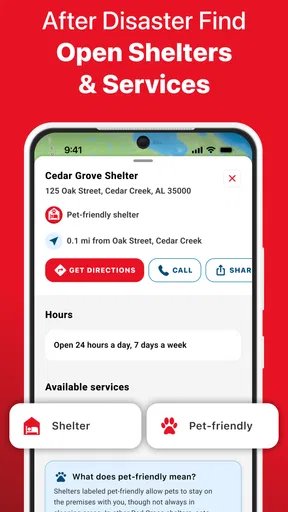
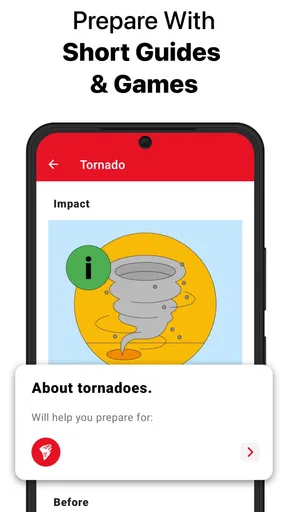
 Analysis by AppCompare
I judge a weather app like this by what it helps me do before conditions become urgent: notice a serious threat, decide whether to change plans, and prepare without having to hunt through a maze of screens. The Emergency: Severe Weather App is aimed at that practical job rather than at making every day’s forecast entertaining. That difference matters if you want a safety-minded tool alongside whatever you already use to check the temperature.
It is a free weather app from the American Red Cross, with an Everyone age rating. Its focus on preparation for hazards such as tornadoes, hurricanes, and earthquakes makes it more of an emergency companion than a general-purpose forecast dashboard. I would consider it most useful for people who live in places exposed to severe weather, travel through them, or want a simple way to think ahead with their household.
Choose it for preparation, not just the daily forecast
Before installing any weather app, I’d ask what decision I need it to support. If I mainly want an at-a-glance temperature, a week of ordinary forecasts, or detailed local conditions for an outdoor hobby, a standard forecast app may be a better fit. If I want emergency information and reminders to prepare for hazards, this app has a more relevant purpose.
That narrower focus is also a trade-off. It makes the app easier to understand as a safety resource, but it should not be treated as a replacement for every forecast source or for official local instructions during an emergency. I’d use it to help me pay attention and plan, then follow the guidance from local authorities when a real warning affects my area.
Keeping You in the Know
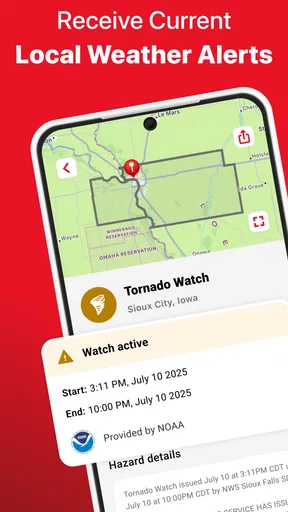
First off, the app’s primary goal is to keep you updated on any severe weather alerts. We all know how unpredictable Mother Nature can be, and having instant notifications about weather changes is a game-changer. The app pulls in data from reliable sources like NOAA, meaning you’re getting the most accurate info possible.
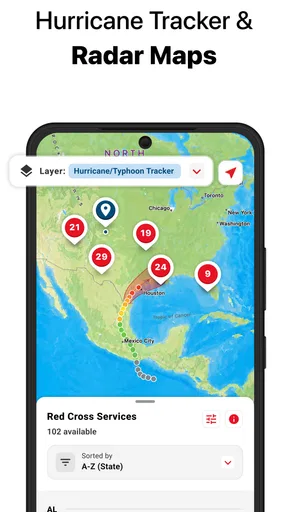
One of the things I appreciated right away was the user-friendly interface. I mean, no one wants to fumble through a complicated app when there’s a tornado warning, right? The home screen is clean and simple, with icons that make sense and a color scheme that’s easy on the eyes. You can quickly access the weather radar, which is quite detailed, showing you everything from rain intensity to storm tracks.
Features That Stand Out
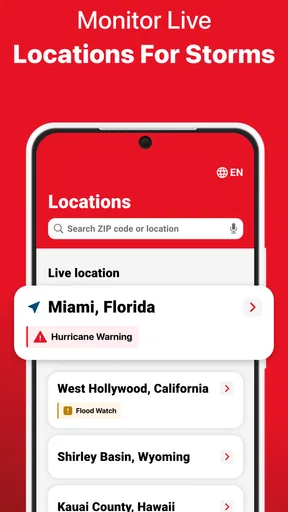
Let’s talk features. One of the coolest things is the app’s ability to send you customized alerts. You can set it up to notify you about specific weather conditions in your area, like thunderstorms, floods, or hurricanes. It even allows for multiple locations, so if you’ve got family in different states, you can keep an eye on their weather too.
Worth Reading Before You Choose

EA SPORTS FC Mobile 26 Is a Bigger Football Game, but It Takes Time

Flipboard Shows What News Apps Must Do Beyond the Feed

Switching to Android Auto Means Rethinking Your Driving Routine

Google Calendar Makes a Crowded Week Easier to Manage

Ludo King Makes the Most of the Minutes Between Plans

Baby Panda World Brings Quick Play to Modern Phones, but Its Game Library Feels Busy
Multiple locations are especially useful when I’m coordinating plans with someone who lives elsewhere. I’d choose only the places I genuinely need to monitor and make sure each one is clearly tied to the right person or destination in my own routine. Otherwise, alerts for several areas can create noise and make it harder to recognize the warning that actually affects me. A sensible setup is better than turning on every possible notification.
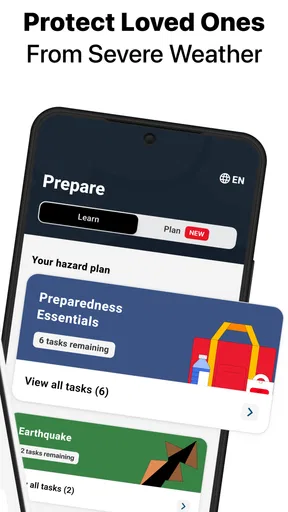
Another standout feature is the emergency kit checklist. It’s honestly a lifesaver. The app offers a comprehensive list of items you might need in case of a weather emergency. You can customize this list based on your personal needs, and trust me, in times of chaos, having this at your fingertips is invaluable.
I’d treat that checklist as a starting point, not a one-time task to tick off and forget. It is more useful if I review it with the people who would actually rely on the kit, then adapt it to practical needs such as medicines, essential documents, and the needs of children or pets. I would also check supplies periodically and keep the physical items somewhere everyone in the household can find them. The app can help organize preparation, but opening a checklist during a crisis is not a substitute for getting essentials ready beforehand.
Getting Through the Storms
Now, let’s talk performance. During my testing, the Emergency: Severe Weather App proved to be pretty reliable. The alerts came through promptly, and the radar updated quickly, which is critical when storms are brewing. The app didn’t crash, and the notifications weren’t annoying or intrusive, a small but significant detail.
I did notice that during peak times, especially when everyone is scrambling to check the weather, the app could lag a bit. But hey, no app is perfect, and the developers seem to be on top of updates and improvements.
That occasional lag is a reason not to make one screen your entire safety plan. I’d check that notifications are enabled on my phone, keep the app available before severe weather is forecast, and avoid waiting until a warning is already underway to install it or work through its setup. If connectivity becomes unreliable, I would turn to official local channels and any emergency information I already have, rather than repeatedly refreshing a slow screen.
Make it fit the way you actually prepare
A realistic use case is a household facing a forecast that could disrupt the school run or a commute. I’d check the alert settings and the relevant location ahead of time, review the kit checklist with the family, and decide where everyone should get updates if plans change. When conditions worsen, the app can help me notice what is happening; the useful work is having already agreed who contacts whom and where to go for local instructions.
For someone who travels, the multiple-location option can help keep a home area in view while checking another place that matters to the trip. I would still verify conditions for the route and destination with an appropriate local source before setting off. A severe-weather tool is most valuable when it prompts an earlier decision, such as postponing an outing, rather than when I use it to justify driving into uncertain conditions.
People who want a map-first experience for everyday rain planning may prefer a dedicated radar or general forecast app as their main tool. Those alternatives can suit users whose routine depends on frequent detailed forecasts, while this app’s strongest reason to be on a phone is emergency readiness. I see them as potentially complementary rather than interchangeable: use a regular forecast app for ordinary planning and keep this one for preparedness and hazard awareness.
There is also a practical setup cost. You need to choose useful locations, decide which alerts deserve a notification, and spend time making the checklist reflect your household. If you skip that work, the app may feel less helpful precisely when you need it. On the other hand, someone who only wants a quick temperature check may find the emergency emphasis unnecessary and would be better served by a simpler daily forecast tool.
Peace of Mind
What I think really sets this app apart is the peace of mind it offers. Whether you’re planning a day out or hunkering down during a storm, having up-to-date information is reassuring. I found myself checking the app regularly, even on sunny days, just to see what might be coming up in the forecast.
Another thing worth mentioning is the community aspect. The app has a feature where users can report weather conditions in real-time, which is then shared with others. It’s like having a neighborhood watch but for weather, and it’s surprisingly effective.
Community reports can provide useful context, but I would treat them as one perspective rather than as a substitute for an official warning. Conditions can vary over a short distance, and a report from another user may not describe what is happening at my location. I’d use those observations to complement alerts, not to dismiss them or make a high-stakes decision on their own.
The app has an average rating of 4.5 from around 2,800 ratings, with roughly 1,300 written reviews, and it has passed 500,000 installs. Those figures suggest that it has found an audience, but I would still judge it by whether its focus matches my needs. It is free, so trying it does not require a purchase; the more important commitment is setting it up thoughtfully and keeping the plan behind the alerts current.
It was released on April 14, 2015, and the current version is 5.2.1, with a minimum operating-system requirement of version 10. I would check that my device meets that requirement before planning around the app. I’d also keep my phone’s own notification settings in mind: an alert app cannot be useful if its notifications are silenced or overlooked.
For a first-time user, I’d begin with the location I care about most, choose alert preferences deliberately, and spend a few quiet minutes adapting the emergency checklist. Then I’d make sure other household members know where the kit is and how the family will share updates. This small routine turns the app from something I install and forget into a tool that can support decisions when weather changes.
In conclusion, the Emergency: Severe Weather App is a solid choice for anyone who needs to stay informed about the weather. With its reliable alerts, easy-to-use interface, and valuable features, it’s definitely worth the download. While there are a few minor hiccups, the benefits far outweigh them. So go ahead, give it a try, and stay safe out there!
My recommendation is strongest for people who want a dedicated layer for severe-weather awareness and household preparation, especially if they will take time to configure locations and act on the checklist before trouble starts. I would not rely on it as my only source of forecasts or emergency guidance, and I would skip it if all I need is a polished everyday outlook. For the right person, though, its focused role is clear: use it to prepare early, stay attentive, and make better-informed choices when conditions become serious.
Pros
- Real-time severe weather alerts.
- Customizable notification settings.
- Detailed radar and maps.
- User-friendly interface design.
- Works offline with cached data.
Cons
- Occasional notification delays.
- High battery consumption.
- Ads in free version can be intrusive.
- Limited features without premium.
- Some users report data inaccuracies.
FAQs for Emergency: Severe Weather App
What features does the Emergency: Severe Weather App offer?
The Emergency: Severe Weather App provides real-time alerts for severe weather conditions, such as storms, hurricanes, and tornadoes. It includes GPS tracking to send location-specific warnings, customizable notification settings, and safety tips. Users can also access detailed weather maps and emergency preparedness resources directly from the app.
Is the Emergency: Severe Weather App free to use?
Yes, the Emergency: Severe Weather App is free to download and use. However, it may offer in-app purchases or premium features that provide additional functionalities, such as advanced tracking or ad-free experiences. Always check the app store listing for details on any potential costs before downloading.
How accurate are the weather alerts provided by the app?
The app sources its data from reliable meteorological organizations and uses GPS technology to provide accurate and timely weather alerts. While it aims to deliver precise information, users should always use multiple sources and local news to verify severe weather conditions. No app can guarantee 100% accuracy due to the unpredictable nature of weather.
Can I customize the types of alerts I receive?
Yes, the app allows users to customize the types of alerts they receive. You can select specific weather events, like thunderstorms or floods, and choose the severity level for which you want to be notified. This ensures you receive alerts that are most relevant to your safety and personal preferences.
Does the app provide support for multiple languages?
The Emergency: Severe Weather App supports multiple languages to cater to a diverse user base. The exact languages available can vary, so it's recommended to check the app settings or the app store listing for the most current information on language support. This feature helps ensure accessibility for non-English speaking users.


